
You have an amazing app idea. It’s clear in your head—you know what it does, who it helps, and why it’s better than anything else out there. The only issue is that you’re not a developer. Hiring app developer can feel overwhelming, especially if you don’t come from a technical background.
The big question now is, “How do I hire someone to turn my idea into a real, working app?”
Hiring an app developer might be intimidating, particularly if you lack technical expertise. There’s jargon, pricing confusion, platforms you’ve never heard of, and contracts full of legalese.
But don’t worry. This blog is your friendly guide to hiring app developers in 2025—no technical knowledge is required. Let’s dive in and turn that brilliant idea of yours into reality.
Table of Contents
- Understanding Your Needs: Start With a Clear Vision
- Exploring Hiring Options: Freelancer, In-House, or Agency?
- Top Platforms for Hiring App Developers in 2025
- Evaluating Potential Candidates: Skills, Fit, and Trust
- Understanding Costs: What Should You Expect to Pay?
- Legal and Contractual Considerations
- Onboarding & Collaboration: Make It Smooth
- Post-Development Support: Don’t Skip This
- What to Include in Your Post-Launch Plan
- Conclusion: Turn Your Vision Into an App—The Smart Way
- FAQS
Understanding Your Needs: Start With a Clear Vision
You must be very clear about what you want before you even begin looking for app developers. If not, you’ll waste money and effort, or worse, you’ll have an app that doesn’t work as you had hoped.
Ask Yourself:
- What problem does your app solve?
- Who are your target users?
- What are the core features it must have?
- Is it for iOS, Android, or both?
- Do you need a mobile app, a web app, or both?
- What’s your budget and timeline?
“A clear plan lays the groundwork for a successful build. Developers can’t read your mind.” – Jessica Powell, Product Manager at Google
Tip: Create a Basic Feature List
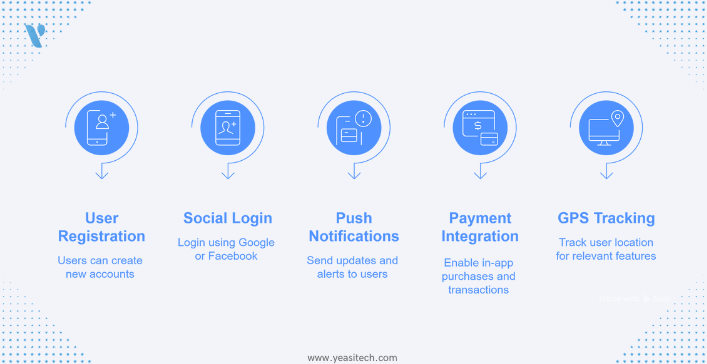
You don’t need a 50-page document. Just list out key features your app should have, like:
- User Registration
- Login with Google/Facebook
- Push notifications
- Payment integration
- GPS tracking
This will help your future developer understand the scope.
Exploring Hiring Options: Freelancer, In-House, or Agency?
Once you know what you need, the next step is to decide who you need. There are three main routes:
A. Freelancers
Best for: Small, simple projects or MVPs (minimum viable products)
Did you know? According to Statista, there were over 24 million freelance developers worldwide in 2028. That’s a massive talent pool!
B. In-House Developers
Best for: Long-term projects or startups with ongoing app developers’ needs
C. Development Agencies
Best for: Complex apps, startups with funding, or entrepreneurs who want everything done for you
Pro Tip: For most first-time founders, hiring a freelance developer or a small boutique agency is the best balance between quality and affordability.
Top Platforms for Hiring App Developers in 2025
You know who you want—now, where do you find them?
Freelancer Platforms:
- Upwork – Great for vetting talent; includes hourly/project pricing
- Toptal – Only the top 3% of freelance talent
- Freelancer.com – Budget-friendly, huge pool
- Fiverr Pro – Pre-vetted, high-quality freelancers
Developer Communities:
- GitHub – Spot active developers by their open-source contributions
- Stack Overflow Talent – Developers who solve real-world coding problems
- Indie Hackers – Many developer-founders looking to collaborate
Agencies & Firms:
- Clutch.co – Directory with verified client reviews
- GoodFirms.co – Research and reviews of top dev agencies
- DesignRush – Compare pricing, expertise, and ratings
“Always look for portfolios and past work—especially apps that are live on the App Store or Google Play.” – David Tan, CTO of AppLaunchers.io
Evaluating Potential Candidates: Skills, Fit, and Trust
Hiring the right app developer is like choosing a business partner. They can make or break your app idea. Here’s a simple checklist for evaluating candidates:
Technical Skills
- Experience with iOS (Swift), Android (Kotlin), or Flutter/React Native for cross-platform
- Backend knowledge: Node.js, Python, Firebase, etc.
- UI/UX design basics
Portfolio
- At least 2–3 published apps
- Look for features similar to yours
- Try out the apps yourself
Communication
- Clear and prompt responses
- Can explain things simply
- Regular updates are promised in the process
Reviews & References
- Ask for client testimonials
- Look for repeat clients—it shows trust
Trial Task (optional but valuable)
- Assign a small paid task to see their process before committing.
Understanding Costs: What Should You Expect to Pay?
Let’s talk money. App development isn’t cheap, but it doesn’t have to break the bank either.
Average Costs in 2025
Cost Variables
- Number of platforms (iOS, Android, Web)
- Features (login, payments, GPS = $$$)
- Design complexity
- Backend development
- Testing & QA
Pro Tip: Start with an MVP (Minimum Viable Product). Launch with core features first, then add more based on user feedback.
Want to learn more about Minimum Viable Product Read our blog:
- Why MVP Development is Crucial for Startup Success in 2025
- Building an MVP and Getting Funded in 2025: A Quick Guide
Legal and Contractual Considerations
This part might sound boring, but it’s crucial. You’re trusting someone with your idea—protect it!
Key Legal Must-Haves
- Non-Disclosure Agreement (NDA): Prevents the developer from sharing or stealing your idea.
- Work-for-Hire Agreement: Ensures you legally own the code, designs, and assets.
- Milestone-Based Contracts: Break down payments by progress stages (e.g., wireframe → prototype → final app).
- Intellectual Property (IP) Clauses: State clearly that you retain all rights to the app.
Onboarding & Collaboration: Make It Smooth
After hiring app developers, it’s time to make sure everything runs smoothly.
Your Responsibilities
- Provide a feature list or app brief
- Share any visual inspiration
- Create an account for app store publishing (Apple, Google)
- Be available for feedback
Use Collaboration Tools
- Slack or Discord – Chat and communication
- Trello or Jira – Task tracking
- Figma – App design and prototypes
- GitHub – Code management and version control
Set Expectations
- Weekly updates
- Shared timelines
- Regular testing checkpoints
Pro Tip: Be responsive. Your feedback helps them move faster and reduces errors.
Post-Development Support: Don’t Skip This
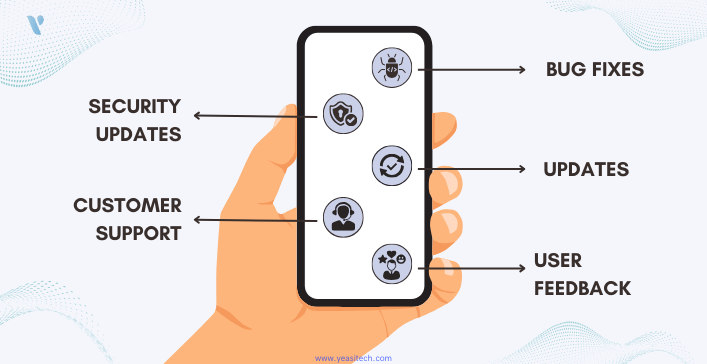
Once your app is launched, the job isn’t over. You’ll need:
1. Bug Fixes
Even the best apps have bugs. Make sure your developer includes 1–3 months of post-launch support.
Examples of common post-launch bugs:
- The app crashes on certain Android phone models
- A payment gateway times out under a heavy load
- GPS features don’t work correctly in specific regions
- Buttons appear misaligned on tablets or larger screens
Stat to Know: According to a study by Dimensional Research, over 88% of app users will abandon an app due to bugs or glitches.
2. Updates & Improvements
iOS and Android release updates constantly. Keep your app compatible.
Regular updates keep your app:
- Compatible with the latest OS updates (iOS/Android)
- Secure against vulnerabilities
- Fast and optimized for new hardware
- Aligned with current design trends and user expectations
Plan for:
- At least quarterly updates, even if no new features are added
- Minor performance improvements and security patches
- Testing on the latest iPhones, Samsung devices, etc.
3. User Feedback & Iterative Improvements
The initial launch is a learning phase. The real test comes when real people start using your app.
Pay close attention to:
- App Store/Play Store reviews
- User feedback via email or support channels
- Analytics tools (like Google Analytics for Firebase or Mixpanel)
You might discover:
- Users are confused about the navigation
- A popular feature is buried too deep in the interface
- Users want additional functionality that you hadn’t considered
Pro Tip: Use tools like Hotjar or UXCam to watch how users interact with your app. These insights are gold.
Be ready to:
- Adjust your UI/UX
- Prioritize feature enhancements
- Kill features that no one uses
4. Security Updates
Cybersecurity isn’t just for big corporations. Even small apps can become targets for hackers, especially if they handle:
- Personal user data
- Location tracking
- Payments or financial info
Regular security checks and updates are a must to prevent:
- Data breaches
- Unauthorized access
- Compliance violations (especially with laws like GDPR)
Essential steps:
- Update third-party libraries and plugins
- Use SSL encryption for all communication
- Implement secure login methods (OAuth, biometric, etc.)
- Regular code audits and penetration testing (at least yearly)
Did You Know? In 2024, mobile app security breaches increased by 28% compared to the previous year, according to Mobile Threat Report.
5. Customer Support & Documentation
While not always handled by developers, good post-development support also includes:
- A FAQ or Help Center
- Email or in-app chat support
- Easy-to-access app documentation or tutorials
Providing helpful support builds trust and reduces uninstall rates.
Tip: Use services like Zendesk, HelpCrunch, or Intercom to manage support professionally.
What to Include in Your Post-Launch Plan
Here’s a quick checklist of what to secure in your post-development support:
Conclusion: Turn Your Vision Into an App—The Smart Way
You now have a clear, beginner-friendly roadmap for hiring app developers. Whether you’re building a small utility app or a massive marketplace, the right developer turns your vision into a living, breathing product.
Don’t wait another week wondering how to start. Take the first step today:
- ✅Write your app brief
- ✅ Explore hiring platforms
- ✅ Schedule interviews or discovery calls
- ✅ Ask for proposals
Still, feeling unsure? Let us help you connect with pre-vetted app developers tailored to your budget and goals

Do you have questions or want help drafting your app brief? Drop them in the comments or message us!
FAQS
1. What does an app developer do?
An app developer creates, tests, and maintains mobile applications for devices like smartphones and tablets. They turn your app idea into a working product by writing code, designing user interfaces, and fixing bugs.
2. How do I know if I need an app developer?
If you have an app idea but don’t know how to build it yourself, you need an app developer. Whether it’s for iOS, Android, or both, a developer helps turn your idea into a real app that people can use.
3. Where can I find reliable app developers in 2025?
You can hire app developers from platforms like Upwork, Toptal, Fiverr, LinkedIn, and Clutch. You can also work with app development agencies or ask for referrals in tech communities.
4. Should I hire a freelance developer or an app development agency?
Freelancers are great for small projects and lower budgets. Agencies are better for complex apps, as they provide a full team (designers, developers, testers, and project managers). Choose based on your budget and app goals.
5. What should I ask before hiring an app developer?
Ask about their experience, portfolio, tech stack, past clients, pricing, timelines, and how they handle communication and updates. This helps you choose someone reliable and skilled.
6. What happens after the app is built?
After development, your app needs testing, launching on app stores, and regular updates. A good developer or agency will offer support and maintenance to keep your app running smoothly.
7. How much does it cost to hire an app developer in 2025?
App development costs vary. A simple app can cost $5,000–$20,000, while complex apps with custom features may cost $50,000 or more. Freelancers usually charge hourly, while agencies may offer fixed-price packages.