
“Money isn’t everything—but managing it well is.”
That phrase still holds true in 2025 for companies, freelancers, and agencies.
If your invoice game isn’t smart, you’re likely leaving money on the table — or worse, delaying payments that are essential for running your operations. The good news? Invoice Software Management in 2025 is smarter, faster, and more powerful than ever.
Let’s dive in.
Table of Contents
- Why Invoice Management Still Matters?
- What Is Invoice Software Management?
- Why Manual Invoicing Doesn’t Work in 2025?
- Key Features of a Good Invoice Software Management
- Invoice Software Comparison: Top Tools in 2025
- Top Benefits of Using Invoice Software Management
- Recommended Tool: Tymora – Smart Invoicing for Modern Businesses
- How to Choose the Right Invoice Software Management
- Wrapping Up
- FAQs
Why Invoice Management Still Matters?
Sending bills these days isn’t only about collecting money; it’s also about maintaining a professional image, according to regulations, and keeping your firm operating efficiently.
Here’s what businesses are up against in 2025:
- 72% of SMBs still report cash flow issues as their top challenge.
- 1 in 3 invoices ends up being paid late, causing ripple effects throughout the supply chain.
- Freelancers spend up to 5 hours per week just following up on payments.
What’s worse? Many are still using outdated systems, or no system at all.
Fun Fact: In 2024, over $825 billion worth of invoices were left unpaid globally, either due to poor follow-up, manual errors, or forgotten documentation.
What Is Invoice Software Management?
Invoice Software Management is the digital process of creating, sending, tracking, approving, and storing invoices using specialized tools. Use an intelligent program that takes care of most of this for you rather than writing up invoices, sending them by email, and following up with clients to collect money.
Fun Fact: The global e-invoicing market is expected to reach $35.9 billion by 2030, growing at a CAGR of 20.4%
Benefits at a Glance
Tools like Tymora handle all of the above, eliminating guesswork.
Why Manual Invoicing Doesn’t Work in 2025?
If you’re still using Word documents, Excel sheets, or PDFs to send invoices, here are the challenges you may be facing:
Key Features of a Good Invoice Software Management
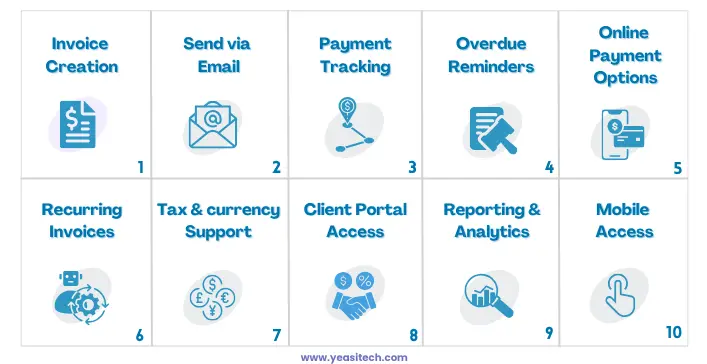
To manage your invoices effectively, look for invoice software management that includes the following essential features:
1. Invoice Creation Tools
Quickly generate clean, professional invoices using pre-built templates. Add your logo, branding, and payment terms. Easily customize fields to suit different clients, currencies, or project types.
2. Send via Email
Send invoices directly from the software to the client’s email. You can track delivery and opens using the majority of tools. This minimizes the possibility of lost or delayed payments and guarantees quicker communication.
3. Payment Tracking
View the real-time status of your invoices:
- Seen or not seen
- Paid or unpaid
- Partially paid
This helps you follow up accurately.
4. Overdue Reminders
Notify customers automatically when an invoice is approaching or has passed its due date. Until the invoice is paid, you can set the system to notify you every few days. This reduces the need for human follow-ups and helps maintain a steady cash flow.
5. Online Payment Options
Let clients pay through secure gateways like:
- Credit/debit cards
- PayPal
- Stripe
- UPI or direct bank transfer (in supported regions)
This improves your chances of receiving payment more quickly.
6. Recurring Invoices
Set up automatic billing every month or every few months for ongoing services. This helps avoid missed payments, keeps things consistent, and saves time. Also, you have the option to add new information or amounts to each recurring invoice as needed.
7. Tax and Currency Support
Automatically work out taxes like sales tax, VAT, or GST based on where the customer is. Handling different currencies helps customers from other countries. This makes global payments easier and helps follow local rules.
8. Client Portal Access
Let customers easily log in, check old invoices, get receipts, and make payments. This saves time, avoids extra messaging, and makes everything clearer. It also lets them see their billing history whenever they want, which builds trust and keeps things easy.
9. Reporting and Analytics
Understand your cash flow through reports:
- Income summaries
- Overdue invoice list
- Payment trends over time
10. Mobile Access
Use a browser add-on or mobile app to handle invoices from anywhere. It lets you track things in real time, approve or make changes quickly, and is great for busy business owners who travel a lot. Even when you’re away, it helps you stay on top of payments and avoid delays.
Invoice Software Comparison: Top Tools in 2025
Here’s a simplified comparison of popular invoice software management tools to help you evaluate options:
Top Benefits of Using Invoice Software Management
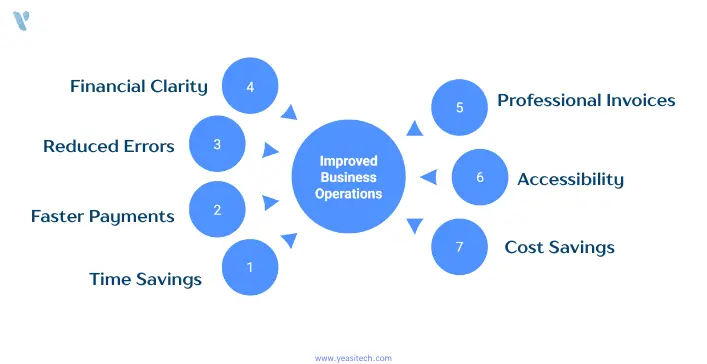
Let’s be honest, no one starts a business because they love sending invoices. But getting paid? That part matters. A lot. That’s where invoice software management. You may access your bills by logging in from any device, including your phone. No lost files, no worries! It eliminates the boring and stressful aspects of billing, making it fast, easy, and somewhat satisfying.
Here’s how it can seriously make your life better:
1. It Saves You Tons of Time
Still making invoices in Word or Excel? Copy-pasting the same stuff over and over? Invoice software management does it all for you. It remembers your client info, adds the right tax, fills in amounts, and sends reminders. You just click, and boom, invoice sent and you get your evenings back!
2. You Get Paid Faster
Nobody likes chasing payments. With invoice software management, your clients get a neat invoice with a “Pay Now” button they can pay instantly using UPI, card, wallet, or bank transfer. No back-and-forth, no delays. You get your money quicker, and it feels so good.
3. Fewer Mistakes = Less Headache
It’s simple to overlook a line item, double-charge a client, or make a mistake with a tax rate while completing things by hand. Behind the scenes, all of that math and reasoning is handled by the program. Everything just works, no embarrassing mistakes, no awkward apologies.
4. You Always Know What’s Going On With Your Money
You can see who has paid, who hasn’t, and how much you owe in a single dashboard using invoice software management. You won’t have to double-check multiple spreadsheets when rent, salary, or bills are due. You know exactly where you stand.
5. Your Invoices Look Sharp and Professional
First impressions count. Invoices that are consistent with your brand logo, colors, thank-you notes, etc., can be sent in place of ones that are boring and unattractive. Customers respect you more, and trust is increased.
6. It Works Wherever You Are
On vacation? At a café? Lost your laptop? No problem. Everything’s stored safely in the cloud. You may access your bills by logging in from any device, including your phone. No lost files, no worry.
7. It Actually Saves You Money
Think of all the time you or your staff spend fixing errors, following up on late payments, or sorting tax info. Now, imagine cutting all that in half. That’s what invoice software does — and many options are super affordable (some even free!).
Recommended Tool: Tymora – Smart Invoicing for Modern Businesses
Tymora.io is YeasiTech’s 2025 pick for invoice software management that actually works.
Whether you’re a solo freelancer, an agency owner, or running a small business, Tymora offers an intuitive platform packed with automation.
Tymora Features
No tech expertise needed — Tymora is built for everyone.
While Tymora is not owned by Yeasitech, it’s our trusted recommendation for smart invoice automation in 2025.
How to Choose the Right Invoice Software Management
Before making a switch, here’s your checklist:
- Can it send invoices via email with tracking?
- Are overdue reminders automatic?
- Can you see when payments are received?
- Is it mobile-friendly?
- Does it support your currency and taxes?
- Does it integrate with payment gateways?
- Are the reports visual and easy to understand?
- Is it beginner-friendly?
Tymora checks every box
Wrapping Up
At YeasiTech, we work closely with growing businesses, freelancers, and agencies every day, and we’ve seen how much time and money can be lost with outdated invoicing methods.
The truth is, manual invoicing just doesn’t cut it anymore. In 2025, businesses need smart, reliable, and easy-to-use tools to stay on top of their payments and cash flow.
That’s why we recommend making the switch to modern invoice software — not just for the automation, but for the peace of mind it brings.
- Create and send invoices in minutes
- Automatically remind clients when payments are overdue
- Track every payment in real time
- Focus more on your work, and less on chasing money
One platform we consistently see helping businesses succeed is Tymora. While YeasiTech doesn’t own it, it’s our trusted pick for anyone looking to simplify invoicing and speed up payments.
FAQs
1. What is invoice software management?
Invoice software management refers to the use of digital tools to create, send, track, and manage invoices automatically. It helps businesses streamline billing, reduce errors, and get paid faster through features like email invoicing, payment tracking, and automated reminders.
2. Why is invoice management important in 2025?
In 2025, invoice management is crucial for maintaining cash flow, avoiding late payments, and reducing manual errors. With more businesses operating remotely, automated invoice software ensures efficiency, faster payments, and better financial visibility.
3. Can invoice software send automatic payment reminders?
Yes, most modern invoice software management includes automated payment reminders. These tools notify clients via email or SMS when an invoice is nearing its due date or becomes overdue, helping you get paid faster without follow-up stress.
4. Is invoice software suitable for freelancers and small businesses?
Absolutely. Many invoice tools like Tymora are designed for freelancers, startups, and small businesses. They’re easy to use, cost-effective, and include features like recurring billing, branded invoices, and one-click payment links.
5. How do I choose the best invoice software for my business?
Look for software that offers easy setup, automated reminders, email invoicing, payment tracking, and integrations with payment gateways. Choose a tool that fits your business size and supports your currency, taxes, and client base.