
With a clear vision and strong passion, you’re ready to tackle challenges. But one key decision awaits: Native or Hybrid mobile app development? Selecting the appropriate strategy is essential in the constantly changing field of mobile app development, particularly for beginners. This choice shapes your project’s cost, timeline, and success. Understanding both paths will guide you through the app development journey.
By the end of this article, you’ll fully understand Native and Hybrid mobile app development, its complexities, pros and cons, performance, and resource needs, enabling you to make an informed choice.
Table of Contents
- What are Native and Hybrid Mobile Apps?
- Native Mobile App Development: The Good, The Bad & The Reality Check
- Hybrid Mobile App Development: The Good, The Bad & The Reality Check
- Steps to Build a Hybrid Mobile App
- Why is Hybrid Development Becoming the Industry Standard?
- The Rise of Hybrid Frameworks in 2025?
- Why Hybrid is the Best Choice for Beginners?
- Real-Life Examples of Successful Hybrid Apps
- Actionable Tips for Hybrid Mobile Apps
- How can YeasiTech Help in Developing Native and Hybrid Mobile Apps?
- Conclusion
What are Native and Hybrid Mobile Apps?
Here is a comparison between Native and Hybrid Mobile Apps, highlighting their key differences in terms of technology, performance, development time, cost, and more:
Native Mobile App Development: The Good, The Bad & The Reality Check
Native apps are built for iOS or Android using Swift or Kotlin. They offer great performance, a smooth user experience, and strong device integration but take more time and cost more to develop. Here’s why:
The Good: Why Choose Native Development?
1. Best-in-Class Performance
- Direct access to device hardware (CPU, GPU, RAM) which results in a faster & smoother experience.
- Perfect for gaming, AR/VR, or high-performance apps
2. Superior UI/UX
- Built with platform-specific design guidelines (Material UI for Android, Human Interface for iOS)
- Animations & interactions feel seamless & responsive
3. Full Access to Native Features
- Direct integration with camera, GPS, Bluetooth, gestures, sensors
- No need for third-party plugins or workarounds
4. More Security & Reliability
- Better encryption & data protection
- Access to the latest OS updates & security patches
5. Long-Term Scalability
- Native apps handle complex updates & new features more efficiently
- Built for future growth without performance bottlenecks
The Bad: Challenges of Native Apps
1. Higher Development Cost
- Requires separate development for iOS (Swift) & Android (Kotlin)
- Need two teams which results in higher costs
2. Longer Development Time
- Writing two separate codebases doubles the effort
- Slower time-to-market compared to hybrid solutions
3. Maintenance Can Be Expensive
- Updates & bug fixes must be managed individually for each platform
- Requires ongoing developer support
4. Larger Storage & Resource Consumption
- Native apps take up more space on the device
- Higher battery & data usage compared to web or hybrid apps
Reality Check: Should You Choose Native?
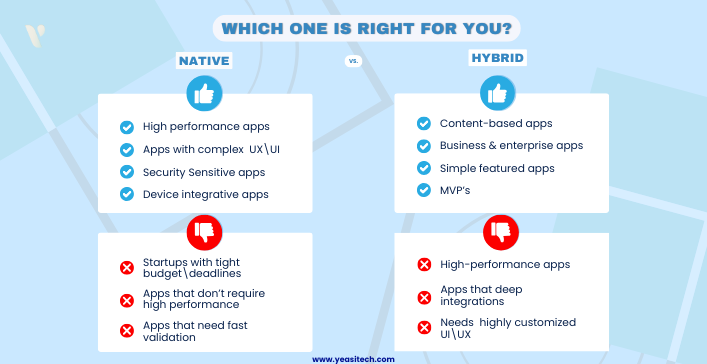
Best for:
- High-performance apps (games, AR/VR, real-time apps)
- Apps with complex UI/UX & animations
- Security-sensitive apps (banking, healthcare)
- Apps needing deep device integrations (IoT, AI, machine learning)
Not ideal for:
- Startups with tight budgets & deadlines
- Simple apps that don’t require high-performance
- Projects needing rapid iteration & MVP validation
Hybrid Mobile App Development: The Good, The Bad & The Reality Check
Hybrid mobile app development lets you build apps for multiple platforms with one codebase. It combines native and web technologies, making development faster and cheaper. However, it also has challenges. Let’s look into the pros, cons, and real-world insights of hybrid mobile apps:
The Good: Advantages of Hybrid App Development
1. One Code, Multiple Platforms
- Write once, run on both iOS & Android
- Saves time, effort, and development costs
2. Faster Development & Quick Launch
- A single codebase speeds up development
- Pre-built components help build apps faster
3. Cost-Effective & Easier Maintenance
4. Access to Native Features
- Plugins allow access to GPS, Camera, Notifications, etc.
- Popular frameworks: React Native, Flutter, Ionic
The Bad: Challenges of Hybrid Mobile Apps
1. Slower Performance
- Hybrid apps rely on WebView, making them slower than native apps
- Not ideal for gaming, AR/VR, or real-time apps
2. UI/UX Limitations
- Animations & complex UI elements may not feel as smooth
- Custom designs may not match native experiences
3. Dependence on Third-Party Tools
- Developers rely on frameworks like React Native, Flutter
- Some native features may need extra work to integrate
4. Limited Native API Access
- Advanced features (e.g., Bluetooth, gestures, sensors) may require native coding
- Reduces the benefit of a single codebase
Reality Check: Should You Choose Hybrid?
Best for:
- Content-based apps (news, blogs, educational apps)
- Business and enterprise applications
- Apps with simple functionality and minimal animations
- MVPs (Minimum Viable Products) for startups looking to validate ideas quickly
When to Avoid Hybrid Apps:
- High-performance apps (gaming, AR/VR, real-time processing apps)
- Apps requiring deep native integrations (Bluetooth, sensors, advanced gestures)
- Applications with highly customized UI/UX
Steps to Build a Hybrid Mobile App
Step 1: Requirement Analysis & Planning
- Define app objectives and features.
- Choose the right framework (React Native, Flutter, Ionic, etc.).
- Plan UI/UX design and backend architecture.
Step 2: Set Up Development Environment
- Install Node.js, npm/yarn, and framework CLI.
- Set up Android Studio/Xcode for testing.
- Initialize a new project with the chosen framework.
Step 3: UI/UX Design
- Design wireframes using Figma, Adobe XD, or Sketch.
- Implement responsive UI using framework components.
- Ensure platform consistency (Material Design for Android, Cupertino for iOS).
Step 4: Develop Frontend & Backend
- Create app screens using a chosen framework.
- Implement state management (Redux, MobX, Provider, Bloc).
- Develop backend using Node.js, Firebase, or other backend technologies.
- Integrate APIs (REST/GraphQL) for data fetching.
Step 5: Testing & Debugging
- Use Jest, Mocha, Chai, or Detox for unit testing.
- Test UI with Appium, Selenium, or Cypress.
- Debug using Chrome DevTools, React DevTools, or Flutter DevTools.
Step 6: Build & Deployment
- Generate production builds using Flutter build, react-native run, or ionic build.
- Sign apps with Google Play Console / Apple App Store certificates.
- Deploy to Google Play Store & Apple App Store.
Step 7: Post-Launch Maintenance & Updates
- Monitor app performance using Firebase Crashlytics, Sentry, or AppDynamics.
- Release updates and bug fixes via CI/CD pipelines.
- Gather user feedback and continuously improve the app.
Why is Hybrid Development Becoming the Industry Standard?
- Lower costs: Companies can develop apps for both platforms with one team.
- Faster time to market: Businesses can launch products more quickly.
- Improved performance: Hybrid frameworks have evolved to handle complex applications efficiently.
- Better developer experience: More tools and community support make learning easier
The Rise of Hybrid Frameworks in 2025?
Hybrid frameworks have seen massive adoption in recent years. A 2024 Stack Overflow survey reported that 42% of developers use React Native or Flutter for mobile app development.
Relevant Statistics on Hybrid vs Native Development
- In 2025, more than half of mobile applications will be built using React Native and Flutter as per Source: Statista, 2025.
- Flutter is the most loved mobile framework, according to the Stack Overflow Developer Survey 2024.
- Companies switching from native to hybrid saw a 25% reduction in maintenance costs as per Forrester, 2025.
Why Hybrid is the Best Choice for Beginners?
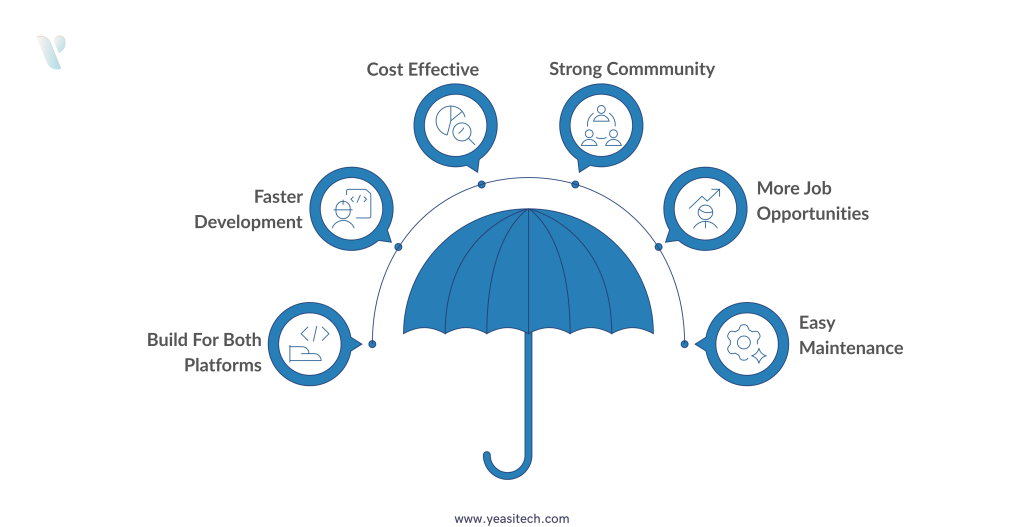
1. Learn One Framework, Build for Both Platforms
You don’t have to study Objective-C, Kotlin, or Swift separately while using hybrid development. With only one set of skills, you can design apps for iOS and Android using JavaScript (React Native) or Dart (Flutter).
2. Faster Development with Hot Reloading
Hybrid frameworks offer hot reloading, which means you can see code changes instantly without restarting the app. This speeds up the development process and helps beginners debug easily.
3. Save Money and Resources
It can be costly to hire several teams for iOS and Android. Hybrid frameworks are ideal for small businesses, freelancers, and startups because they require only one team to develop for both platforms.
4. Strong Community Support
React Native and Flutter have huge developer communities. There are many tutorials, open-source libraries, and forums available to assist you if you run into problems.
Book a free consultation with a YeasiTech expert and get top-notch advice regarding Hybrid Mobile App
5. More Employment Opportunities
Hybrid development is preferred by many businesses due to its speed and lower cost. Learning React Native or Flutter increases your chances of getting hired!
6. Easier Maintenance
With one codebase, updates and bug fixes are much simpler. This is a huge advantage over native development, where separate updates are needed for iOS and Android.
Real-Life Examples of Successful Hybrid Apps
Here are some real-life examples of successful hybrid mobile apps:
1. Instagram
Technology: Uses React Native (initially a hybrid app).
Impact & Results:
This solution ensures a seamless iOS and Android experience with consistent performance. It enables offline access via cached data, keeping users connected. The app offers a smooth, interactive UI with native-like performance, boosting engagement. With 2+ billion users, its impact is vast.
2. Gmail
Technology: Uses hybrid web technology (JavaScript-based).
Impact & Results:
Gmail offers fast, efficient email management and seamless integration with Google services, boosting productivity. With over 1.5 billion users, it’s one of the world’s most popular email platforms.
3. Uber
Technology: Uses a hybrid web framework (m.uber.com) for rider and driver apps.
Impact & Results:
Fast, scalable, and user-friendly. Seamless booking for 130M+ users worldwide.
4. Airbnb
Technology: Initially hybrid, then adopted React Native.
Impact & Results:
The platform offers a smooth, intuitive interface for travelers and hosts, scaling globally with millions of listings. It manages high engagement efficiently with real-time interactions for seamless experiences.
Fun Fact: Google is using Flutter for its next-generation apps, proving its reliability for big projects.
Actionable Tips for Hybrid Mobile Apps
- Start with React Native or Flutter – Both are beginner-friendly and have extensive documentation and community support.
- Learn JavaScript (for React Native) or Dart (for Flutter) – Mastering the programming language will make development smoother.
- Use Pre-built UI Components – Save time by using libraries like React Native Paper or Flutter’s Material Components.
- Test on Real Devices Early – Simulators are great, but real-world performance testing on physical devices is essential.
- Use Expo for React Native – Expo simplifies development and debugging, making it ideal for beginners.
- Follow Official Tutorials and Courses – Free resources from Meta (React Native) and Google (Flutter) provide valuable insights.
- Join Developer Communities – Platforms like Stack Overflow, Discord, and Reddit help solve common issues quickly.
- Optimize Performance – Learn how to reduce re-renders in React Native and use Flutter’s efficient widget tree.
- Stay Updated with Framework Changes – Both React Native and Flutter evolve rapidly; keep up with new features.
- Build and Publish a Small App – The best way to learn is by doing. Try building a simple to-do list, weather app, or calculator.
How can YeasiTech Help in Developing Native and Hybrid Mobile Apps?
At YeasiTech, customers and prospective customers frequently ask us which option is best for them. We have hands-on experience in both native and hybrid mobile app development. We are able to offer a thorough analysis that surpasses theory because of our in-depth knowledge of the complexities, benefits, and drawbacks of each strategy. Regardless of whether they choose to engage with us or not, we have a track record of helping potential clients make well-informed decisions that support their objectives.

Conclusion
Choosing between Native and Hybrid app development impacts performance, cost, and scalability. Native apps excel in performance and user experience, while Hybrid apps offer affordability and faster development—ideal for startups.
With evolving frameworks like React Native and Flutter, Hybrid development is more efficient than ever, gaining traction as an industry standard in 2025 and beyond.
For beginners, Hybrid allows cross-platform development with one codebase. However, for top performance, security, or complex features, Native is the better choice.
Need help deciding? YeasiTech’s experts can guide you. Book a free consultation today to bring your app idea to life!
1. What is the difference between native and hybrid mobile app development?
Native mobile apps are built specifically for a platform (iOS or Android) using languages like Swift or Kotlin. Hybrid mobile apps use web technologies (HTML, CSS, JavaScript) and run inside a native container, making them cross-platform.
2. Why is hybrid mobile app development better for beginners in 2025?
Hybrid development is easier for beginners because it uses web development skills (HTML, CSS, JS), has a faster learning curve, and allows deployment on multiple platforms with a single codebase, reducing effort and cost
3. Which frameworks are best for hybrid mobile app development in 2025?
The top hybrid frameworks include Flutter, React Native, Ionic, and Capacitor, offering great performance, community support, and easy integration with native features.
4. Are hybrid mobile apps good for performance in 2025?
Yes, modern hybrid frameworks like Flutter and React Native provide near-native performance with optimized UI rendering, making them a great choice even for demanding applications.
5. What are the cost benefits of hybrid mobile app development?
Hybrid development reduces costs by allowing developers to write one codebase for multiple platforms, cutting development time, maintenance costs, and the need for separate native developers.